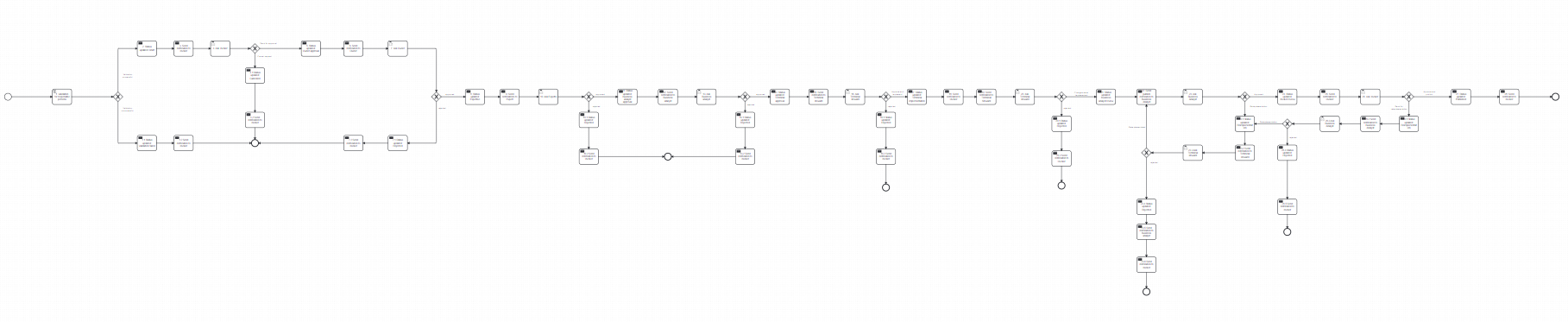
Change request
The Change Request process ensures all modifications are reviewed and approved before implementation
Step 1: Validation
General
Name: Validation
Script
- Format: JavaScript
- Type: Inline script
- Script:
JSON.parse(execution.getVariable("users"))["owner"] !== undefined &&
JSON.parse(execution.getVariable("users"))["expert"] !== undefined &&
JSON.parse(execution.getVariable("users"))["analyst"] !== undefined &&
JSON.parse(execution.getVariable("users"))["tech_steward"] !== undefined
- Result variable:
check
Asynchronous continuations
- Before and Exclusive
Job execution
- Retry time cycle:
R5/PT5M
Flow conditions
- If
Validation successful: proceed to Step 2. - If
Validation failed: proceed to Step 1.1.
Step 1.1: Status Updated: Verification failed
General
Name: Status Updated: Verification failed
Implementation
- Type: Connector
- Connector ID: http-connector
Asynchronous continuations
- Before and Exclusive
Job execution
- Retry time cycle: R5/PT5M
Connector inputs
Headers
- Local variable name:
headers - Assignment type: Map
- Map entries:
- Key: Content-Type
- Value: application/json
Method
- Local variable name:
method - Assignment type: String or expression
- Value: POST
Payload
- Local variable name:
payload - Assignment type: Script
- Format: JavaScript
- Type: Inline script
- Script:
JSON.stringify({
    execution_id: execution.getId(),
    stage: "Validation failed",
    payload: [
        {role: "others", status: "validation_failed"}
    ]
});
Step 1.2: Send Notification to Business user
General
Name: Send notification to Business user
Implementation
- Type: Connector
- Connector ID: http-connector
Asynchronous continuations
- Before and Exclusive
Job execution
- Retry time cycle: R5/PT5M
Connector inputs
Headers
- Local variable name:
headers - Assignment type: Map
- Map entries:
- Key: Content-Type
- Value: application/json
Method
- Local variable name:
method - Assignment type: String or expression
- Value: POST
Payload
- Local variable name:
payload - Assignment type: Script
- Format: JavaScript
- Type: Inline script
- Script:
JSON.stringify({
    execution_id:execution.getId(),
    stage:"Validation failed",
    is_completed:true,
    payload: {
      to: [execution.getVariable("invoker_id")],
      message: "Dear user, no responsible roles have been assigned. Please contact the Admin.",
      need: {
        mass_approve: false,
        response: false,
        assign: false
      },
      ui: {
        caption: "",
        assign: "",
      buttons: {}
      }
    }
});
End event
Step 2: Status updated: Draft
General
Name: Status updated: Draft
Implementation
- Type: Connector
- Connector ID: http-connector
Asynchronous continuations
- Before and Exclusive
Job execution
- Retry time cycle: R5/PT5M
Connector inputs
Headers
- Local variable name:
headers - Assignment type: Map
- Map entries:
- Key: Content-Type
- Value: application/json
Method
- Local variable name:
method - Assignment type: String or expression
- Value: POST
Payload
- Local variable name:
payload - Assignment type: Script
- Format: JavaScript
- Type: Inline script
- Script:
JSON.stringify({
   execution_id:execution.getId(),
   stage:"Defining the сhanges",
   payload:[
       {role:"others",status:"draft"}
   ]
});
Step 3: Send notification to Business user
General
Name: Send notification to Business user
Implementation
- Type: Connector
- Connector ID: http-connector
Asynchronous continuations
- Before and Exclusive
Job execution
- Retry time cycle: R5/PT5M
Connector inputs
Headers
- Local variable name:
headers - Assignment type: Map
- Map entries:
- Key: Content-Type
- Value: application/json
Method
- Local variable name:
method - Assignment type: String or expression
- Value: POST
Payload
- Local variable name:
payload - Assignment type: Script
- Format: JavaScript
- Type: Inline script
- Script:
JSON.stringify({
   execution_id:execution.getId(),
   stage:"Defining the сhanges",
   is_completed:false,
   payload: {
     to: [execution.getVariable("invoker_id")],
     message: "Dear user, please provide the reason for the change request for the Owner's review.",
     need: {
       mass_approve: false,
       response: true,
       assign: false
     },
     ui: {
       caption:"",
       assign: "",
    buttons: {
         approve:"Send for approval",
         reject:"Cancel request"
       }
     }
   }
});
Step 4: Ask Business user
- If
Send for approval: proceed to Step 5. - If
Cancel request: proceed to Step 4.1.
Step 4.1: Status updated: Cancelled
General
Name: Status updated: Cancelled
Implementation
- Type: Connector
- Connector ID: http-connector
Asynchronous continuations
- Before and Exclusive
Job execution
- Retry time cycle: R5/PT5M
Connector inputs
Headers
- Local variable name:
headers - Assignment type: Map
- Map entries:
- Key: Content-Type
- Value: application/json
Method
- Local variable name:
method - Assignment type: String or expression
- Value: POST
Payload
- Local variable name:
payload - Assignment type: Script
- Format: JavaScript
- Type: Inline script
- Script:
JSON.stringify({
    execution_id:execution.getId(),
    stage:"Change request cancelled",
    payload:[
        {role:"others",status:"cancelled"}
    ]
});
Step 4.2: Send notification to Business user
General
Name: Send notification to Business user
Implementation
- Type: Connector
- Connector ID: http-connector
Asynchronous continuations
- Before and Exclusive
Job execution
- Retry time cycle: R5/PT5M
Connector inputs
Headers
- Local variable name:
headers - Assignment type: Map
- Map entries:
- Key: Content-Type
- Value: application/json
Method
- Local variable name:
method - Assignment type: String or expression
- Value: POST
Payload
- Local variable name:
payload - Assignment type: Script
- Format: JavaScript
- Type: Inline script
- Script:
JSON.stringify({
    execution_id:execution.getId(),
    stage:"Change request cancelled",
    is_completed:true,
    payload:{
        to:[execution.getVariable("invoker_id")],
        message:"Dear user, your change request has been successfully canceled.",
        need:{
            mass_approve:false,
            response: false,
            assign: false
        },
        ui:{
            caption: "",
            assign:"",
            buttons:{}
        }
    }
});
End Event
Step 5: Status Updated: Owner approval
General
Name: Status updated: Owner approval
Implementation
- Type: Connector
- Connector ID: http-connector
Asynchronous continuations
- Before and Exclusive
Job execution
- Retry time cycle: R5/PT5M
Connector inputs
Headers
- Local variable name:
headers - Assignment type: Map
- Map entries:
- Key: Content-Type
- Value: application/json
Method
- Local variable name:
method - Assignment type: String or expression
- Value: POST
Payload
- Local variable name:
payload - Assignment type: Script
- Format: JavaScript
- Type: Inline script
- Script:
JSON.stringify({
    execution_id:execution.getId(),
    stage:"Owner approval",
    payload:[
        {role:"others",status:"pending_owner's_approval"}
    ]
});
Step 6: Send Notification to Owner
General
Name: Send notification to Owner
Implementation
- Type: Connector
- Connector ID: http-connector
Asynchronous continuations
- Before and Exclusive
Job execution
- Retry time cycle: R5/PT5M
Connector inputs
Headers
- Local variable name:
headers - Assignment type: Map
- Map entries:
- Key: Content-Type
- Value: application/json
Method
- Local variable name:
method - Assignment type: String or expression
- Value: POST
Payload
- Local variable name:
payload - Assignment type: Script
- Format: JavaScript
- Type: Inline script
- Script:
JSON.stringify({
    execution_id:execution.getId(),
    stage:"Owner approval",
    is_completed:false,
    payload:{
         to: JSON.parse(execution.getVariable("users"))["owner"],
        message:execution.getVariable("expertise_text"),
        need:{
            mass_approve:false,
            response:true,
            assign:false
        },
        ui:{
            caption:"Dear user, changes have been proposed for this object, and you have received this notification for review. Please leave a comment for the expert and click 'Approve changes' if you agree to send the request. If you do not agree, provide a reason for rejection and click 'Reject changes'. You can check the comments on the changes above.",
            assign:"",
            buttons:{
                approve:"Approve changes",
                reject:"Reject changes"
            }
        }
    }
});
Step 7: Ask Owner
- If
Approve changes: proceed to Step 8. - If
Reject changes: proceed to Step 7.1.
Step 7.1: Status Updated: Rejected
General
Name: Status updated: Rejected
Implementation
- Type: Connector
- Connector ID: http-connector
Asynchronous continuations
- Before and Exclusive
Job execution
- Retry time cycle: R5/PT5M
Connector inputs
Headers
- Local variable name:
headers - Assignment type: Map
- Map entries:
- Key: Content-Type
- Value: application/json
Method
- Local variable name:
method - Assignment type: String or expression
- Value: POST
Payload
- Local variable name:
payload - Assignment type: Script
- Format: JavaScript
- Type: Inline script
- Script:
JSON.stringify({
    execution_id:execution.getId(),
    stage:"Owner rejected change request",
    is_completed:true,
    payload:[
        {role:"others",status:"rejected"}
    ]
});
Step 7.2: Send Notification to Business user
General
Name: Send notification to Business user
Implementation
- Type: Connector
- Connector ID: http-connector
Asynchronous continuations
- Before and Exclusive
Job execution
- Retry time cycle: R5/PT5M
Connector inputs
Headers
- Local variable name:
headers - Assignment type: Map
- Map entries:
- Key: Content-Type
- Value: application/json
Method
- Local variable name:
method - Assignment type: String or expression
- Value: POST
Payload
- Local variable name:
payload - Assignment type: Script
- Format: JavaScript
- Type: Inline script
- Script:
JSON.stringify({
    execution_id:execution.getId(),
    stage:"Owner rejected change request",
    is_completed:true,
    payload: {
      to:[execution.getVariable("invoker_id")],
      message: execution.getVariable("expertise_text"),
      need: {
        mass_approve:false,
        response:false,
        assign:false
      },
      ui: {
        caption:"Dear user, your change request has been rejected by the Owner.",
        assign:"",
        buttons:{}
      }
    }
});
End event
Step 8: Status Updated: Expertise
General
Name: Status updated: Expertise
Implementation
- Type: Connector
- Connector ID: http-connector
Asynchronous continuations
- Before and Exclusive
Job execution
- Retry time cycle: R5/PT5M
Connector inputs
Headers
- Local variable name:
headers - Assignment type: Map
- Map entries:
- Key: Content-Type
- Value: application/json
Method
- Local variable name:
method - Assignment type: String or expression
- Value: POST
Payload
- Local variable name:
payload - Assignment type: Script
- Format: JavaScript
- Type: Inline script
- Script:
JSON.stringify({
    execution_id:execution.getId(),
    stage:"Expert approval",
    payload:[
        {role:"others",status:"expertise"}
    ]
});
Step 9: Send Notification to Expert
General
Name: Send notification to Expert
Implementation
- Type: Connector
- Connector ID: http-connector
Asynchronous continuations
- Before and Exclusive
Job execution
- Retry time cycle: R5/PT5M
Connector inputs
Headers
- Local variable name:
headers - Assignment type: Map
- Map entries:
- Key: Content-Type
- Value: application/json
Method
- Local variable name:
method - Assignment type: String or expression
- Value: POST
Payload
- Local variable name:
payload - Assignment type: Script
- Format: JavaScript
- Type: Inline script
- Script:
JSON.stringify({
    execution_id:execution.getId(),
    stage:"Expert approval",
    is_completed:false,
    payload:{
      to:JSON.parse(execution.getVariable("users"))["expert"],
      message:execution.getVariable("expertise_text"),
      need:{
        mass_approve:false,
        response:true,
        assign:false
      },
      ui: {
        caption:"Dear user, the Owner has approved the proposed changes, and you have received this notification for expert review. Please leave a comment for the steward to implement after your confirmation. If you agree, click 'Approve changes' to proceed. If you do not agree, provide a reason for rejection and click 'Reject changes'. You can check the comments on the changes above.",
        assign:"",
        buttons:{
              "approve":"Approve changes",
              "reject":"Reject changes",
        }
      }
    }
});
Step 10: Ask Expert
- If
Approve changes: proceed to Step 11. - If
Reject changes: proceed to Step 10.1.
Step 10.1: Status Updated: Rejected
General
Name: Status updated: Rejected
Implementation
- Type: Connector
- Connector ID: http-connector
Asynchronous continuations
- Before and Exclusive
Job execution
- Retry time cycle: R5/PT5M
Connector inputs
Headers
- Local variable name:
headers - Assignment type: Map
- Map entries:
- Key: Content-Type
- Value: application/json
Method
- Local variable name:
method - Assignment type: String or expression
- Value: POST
Payload
- Local variable name:
payload - Assignment type: Script
- Format: JavaScript
- Type: Inline script
- Script:
JSON.stringify({
    execution_id:execution.getId(),
    stage:"Expert rejected change request",
    is_completed:true,
    payload:[
        {role:"others",status:"rejected"}
    ]
});
Step 10.2: Send Notification to Business user
General
Name: Send notification to Business user
Implementation
- Type: Connector
- Connector ID: http-connector
Asynchronous continuations
- Before and Exclusive
Job execution
- Retry time cycle: R5/PT5M
Connector inputs
Headers
- Local variable name:
headers - Assignment type: Map
- Map entries:
- Key: Content-Type
- Value: application/json
Method
- Local variable name:
method - Assignment type: String or expression
- Value: POST
Payload
- Local variable name:
payload - Assignment type: Script
- Format: JavaScript
- Type: Inline script
- Script:
JSON.stringify({
    execution_id:execution.getId(),
    stage:"Expert rejected change request",
    is_completed:true,
    payload: {
      to:[execution.getVariable("invoker_id")],
      message: execution.getVariable("expertise_text"),
      need: {
        mass_approve:false,
        response:false,
        assign:false
      },
      ui: {
        caption:"Dear user, your change request has been rejected by the Expert. You can review the reason above.",
        assign:"",
        buttons:{}
      }
    }
});
End Event
Step 11: Status Updated: Business analyst approval
General
Name: Status updated: Business analyst approval
Implementation
- Type: Connector
- Connector ID: http-connector
Asynchronous continuations
- Before and Exclusive
Job execution
- Retry time cycle:
R5/PT5M
Connector inputs
Headers
- Local variable name:
headers - Assignment type: Map
- Map entries:
- Key: Content-Type
- Value: application/json
Method
- Local variable name:
method - Assignment type: String or expression
- Value: POST
Payload
- Local variable name:
payload - Assignment type: Script
- Format: JavaScript
- Type: Inline script
JSON.stringify({
    execution_id:execution.getId(),
    stage:"Business analyst approval",
    payload:[
        {role:"others",status:"BA_approval"}
    ]
});
Step 12: Send Notification to Business analyst
General
Name: Send notification to Business analyst
Implementation
- Type: Connector
- Connector ID: http-connector
Asynchronous continuations
- Before and Exclusive
Job execution
- Retry time cycle: R5/PT5M
Connector inputs
Headers
- Local variable name:
headers - Assignment type: Map
- Map entries:
- Key: Content-Type
- Value: application/json
Method
- Local variable name:
method - Assignment type: String or expression
- Value: POST
Payload
- Local variable name:
payload - Assignment type: Script
- Format: JavaScript
- Type: Inline script
- Script:
JSON.stringify({
    execution_id:execution.getId(),
    stage:"Business analyst approval",
    is_completed:false,
    payload:{
      to: JSON.parse(execution.getVariable("users"))["analyst"],
      message: execution.getVariable("expertise_text"),
      need: {
        mass_approve: false,
        response: true,
        assign: false
      },
      ui:{
        caption: "Dear user, the Owner and the Expert have approved the proposed changes, and you have received this notification for review. Please leave a comment for the technical steward to implement after your confirmation. If you agree, click 'Approve changes' to proceed. If you do not agree, provide a reason for rejection and click 'Reject changes'. You can check the comments on the changes above.",
        assign: "",
 buttons: {
              "approve":"Approve changes",
       "reject":"Reject changes",
        }
      }
    }
});
Step 13: Ask the Business analyst
- If
Approve changes: proceed to Step 14. - If
Reject changes: proceed to Step 13.1.
Step 13.1: Status Updated: Rejected
General
Name: Status updated: Rejected
Implementation
- Type: Connector
- Connector ID: http-connector
Asynchronous continuations
- Before and Exclusive
Job execution
- Retry time cycle: R5/PT5M
Connector inputs
Headers
- Local variable name:
headers - Assignment type: Map
- Map entries:
- Key: Content-Type
- Value: application/json
Method
- Local variable name:
method - Assignment type: String or expression
- Value: POST
Payload
- Local variable name:
payload - Assignment type: Script
- Format: JavaScript
- Type: Inline script
- Script:
JSON.stringify({
    execution_id:execution.getId(),
    stage:"Business analyst rejected change request",
    is_completed:true,
    payload:[
        {role:"others",status:"rejected"}
    ]
});
Step 13.2: Send Notification to Business user
General
Name: Send notification to Business user
Implementation
- Type: Connector
- Connector ID: http-connector
Asynchronous continuations
- Before and Exclusive
Job execution
- Retry time cycle: R5/PT5M
Connector inputs
Headers
- Local variable name:
headers - Assignment type: Map
- Map entries:
- Key: Content-Type
- Value: application/json
Method
- Local variable name:
method - Assignment type: String or expression
- Value: POST
Payload
- Local variable name:
payload - Assignment type: Script
- Format: JavaScript
- Type: Inline script
- Script:
JSON.stringify({
    execution_id:execution.getId(),
    stage:"Business analyst rejected change request",
    is_completed:true,
    payload: {
      to:[execution.getVariable("invoker_id")],
      message: execution.getVariable("expertise_text"),
      need: {
        mass_approve:false,
        response:false,
        assign:false
      },
      ui: {
        caption:"Dear user, your change request has been rejected by the Business analyst. You can review the reason above.",
        assign:"",
 buttons:{}
      }
    }
});
End Event
Step 14: Status Updated: Technical approval
General
Name: Status updated: Technical approval
Implementation
- Type: Connector
- Connector ID: http-connector
Asynchronous continuations
- Before and Exclusive
Job execution
- Retry time cycle: R5/PT5M
Connector inputs
Headers
- Local variable name:
headers - Assignment type: Map
- Map entries:
- Key: Content-Type
- Value: application/json
Method
- Local variable name:
method - Assignment type: String or expression
- Value: POST
Payload
- Local variable name:
payload - Assignment type: Script
- Format: JavaScript
- Type: Inline script
- Script:
JSON.stringify({
    execution_id:execution.getId(),
    stage:"Technical steward approval",
    payload:[
        {role:"others",status:"pending_TS_approval"}
    ]
});
Step 15: Send Notification to Technical steward
General
Name: Send notification to Technical steward
Implementation
- Type: Connector
- Connector ID: http-connector
Asynchronous continuations
- Before and Exclusive
Job execution
- Retry time cycle: R5/PT5M
Connector inputs
Headers
- Local variable name:
headers - Assignment type: Map
- Map entries:
- Key: Content-Type
- Value: application/json
Method
- Local variable name:
method - Assignment type: String or expression
- Value: POST
Payload
- Local variable name:
payload - Assignment type: Script
- Format: JavaScript
- Type: Inline script
- Script:
JSON.stringify({
    execution_id:execution.getId(),
    stage:"Technical steward approval",
    is_completed:false,
    payload:{
        to: JSON.parse(execution.getVariable("users"))["tech_steward"],
        message:execution.getVariable("expertise_text"),
        need:{
            mass_approve:false,
            response:true,
            assign:false
        },
        ui:{
            caption:"Dear user, the Owner, Expert, and Business analyst have approved the proposed changes, and you have received this notification for review. If you agree, click `Approve and implement` to proceed. If you do not agree, provide a reason for rejection and click `Reject change implementation.` You can check the comments on the changes above.",
            assign:"",
            buttons:{
                approve:"Approve and implement",
                reject:"Reject change implementation"
            }
        }
    }
});
Step 16: Ask the Technical Steward
- If
Approve and implement: proceed to Step 17. - If
Reject change implementation: proceed to Step 16.1.
Step 16.1: Status Updated: Rejected
General
Name: Status updated: Rejected
Implementation
- Type: Connector
- Connector ID: http-connector
Asynchronous continuations
- Before and Exclusive
Job execution
- Retry time cycle: R5/PT5M
Connector inputs
Headers
- Local variable name:
headers - Assignment type: Map
- Map entries:
- Key: Content-Type
- Value: application/json
Method
- Local variable name:
method - Assignment type: String or expression
- Value: POST
Payload
- Local variable name:
payload - Assignment type: Script
- Format: JavaScript
- Type: Inline script
- Script:
JSON.stringify({
    execution_id:execution.getId(),
    stage:"Technical steward rejected change request",
    is_completed:true,
    payload:[
        {role:"others",status:"rejected"}
    ]
});
Step 16.2: Send Notification to Business user
General
Name: Send notification to Business user
Implementation
- Type: Connector
- Connector ID: http-connector
Asynchronous continuations
- Before and Exclusive
Job execution
- Retry time cycle: R5/PT5M
Connector inputs
Headers
- Local variable name:
headers - Assignment type: Map
- Map entries:
- Key: Content-Type
- Value: application/json
Method
- Local variable name:
method - Assignment type: String or expression
- Value: POST
Payload
- Local variable name:
payload - Assignment type: Script
- Format: JavaScript
- Type: Inline script
- Script:
JSON.stringify({
    execution_id:execution.getId(),
    stage:"Technical steward rejected change request",
    is_completed:true,
    payload: {
      to:[execution.getVariable("invoker_id")],
      message: execution.getVariable("expertise_text"),
      need: {
        mass_approve:false,
        response:false,
        assign:false
      },
      ui: {
        caption:"Dear user, your change request has been rejected by the Technical steward. You can review the reason above.",
        assign:"",
 buttons:{}
      }
    }
});
End event
Step 17: Status Updated: Changes in progress
General
Name: Status updated: Changes in progress
Implementation
- Type: Connector
- Connector ID: http-connector
Asynchronous continuations
- Before and Exclusive
Job execution
- Retry time cycle:
R5/PT5M
Connector inputs
Headers
- Local variable name:
headers - Assignment type: Map
- Map entries:
- Key: Content-Type
- Value: application/json
Method
- Local variable name:
method - Assignment type: String or expression
- Value: POST
Payload
- Local variable name:
payload - Assignment type: Script
- Format: JavaScript
- Type: Inline script
JSON.stringify({
    execution_id:execution.getId(),
    stage:"Changes in progress",
    payload:[
        {role:"others",status:"changes_in_progress"}
    ]
});
Step 18: Send Notification to Business user
General
Name: Send notification to Business user
Implementation
- Type: Connector
- Connector ID: http-connector
Asynchronous continuations
- Before and Exclusive
Job execution
- Retry time cycle: R5/PT5M
Connector inputs
Headers
- Local variable name:
headers - Assignment type: Map
- Map entries:
- Key: Content-Type
- Value: application/json
Method
- Local variable name:
method - Assignment type: String or expression
- Value: POST
Payload
- Local variable name:
payload - Assignment type: Script
- Format: JavaScript
- Type: Inline script
- Script:
JSON.stringify({
    execution_id:execution.getId(),
    stage:"Changes in progress",
    is_completed:false,
    payload:{
        to:[execution.getVariable("invoker_id")],
        message:"Dear user, the changes are now being implemented. You will be notified once the process is complete.",
        need:{
            mass_approve:false,
            response:false,
            assign:false
        },
        ui:{
            caption:"",
            assign:"",
            buttons:{}
        }
    }
});
Step 19: Send Notification to Technical steward
General
Name: Send notification to Technical steward
Implementation
- Type: Connector
- Connector ID: http-connector
Asynchronous continuations
- Before and Exclusive
Job execution
- Retry time cycle: R5/PT5M
Connector inputs
Headers
- Local variable name:
headers - Assignment type: Map
- Map entries:
- Key: Content-Type
- Value: application/json
Method
- Local variable name:
method - Assignment type: String or expression
- Value: POST
Payload
- Local variable name:
payload - Assignment type: Script
- Format: JavaScript
- Type: Inline script
- Script:
JSON.stringify({
    execution_id:execution.getId(),
    stage:"Changes in progress",
    is_completed:false,
    payload:{
        to: JSON.parse(execution.getVariable("users"))["tech_steward"],
        message:execution.getVariable("expertise_text"),
        need:{
            mass_approve:false,
            response:true,
            assign:false
        },
        ui:{
            caption:"Dear user, please confirm that the changes have been implemented. If the changes have been implemented, click `Mark as implemented` to proceed. If you do not agree, provide a reason for rejection and click `Reject implementation`. You can review the comments on the changes above.",
            assign:"",
            buttons:{
                approve:"Mark as implemented",
                reject:"Reject implementation"
            }
        }
    }
});
Step 20: Ask the Technical steward
- If
Mark as implemented: proceed to Step 21. - If
Reject implementation: proceed to Step 20.1.
Step 20.1: Status Updated: Rejected
General
Name: Status updated: Rejected
Implementation
- Type: Connector
- Connector ID: http-connector
Asynchronous continuations
- Before and Exclusive
Job execution
- Retry time cycle: R5/PT5M
Connector inputs
Headers
- Local variable name:
headers - Assignment type: Map
- Map entries:
- Key: Content-Type
- Value: application/json
Method
- Local variable name:
method - Assignment type: String or expression
- Value: POST
Payload
- Local variable name:
payload - Assignment type: Script
- Format: JavaScript
- Type: Inline script
- Script:
JSON.stringify({
    execution_id:execution.getId(),
    stage:"Technical steward rejected change request",
    is_completed:true,
    payload:[
        {role:"others",status:"rejected"}
    ]
});
Step 20.2: Send Notification to Business user
General
Name: Send notification to Business user
Implementation
- Type: Connector
- Connector ID: http-connector
Asynchronous continuations
- Before and Exclusive
Job execution
- Retry time cycle: R5/PT5M
Connector inputs
Headers
- Local variable name:
headers - Assignment type: Map
- Map entries:
- Key: Content-Type
- Value: application/json
Method
- Local variable name:
method - Assignment type: String or expression
- Value: POST
Payload
- Local variable name:
payload - Assignment type: Script
- Format: JavaScript
- Type: Inline script
- Script:
JSON.stringify({
    execution_id:execution.getId(),
    stage:"Technical steward rejected change request",
    is_completed:true,
    payload: {
      to:[execution.getVariable("invoker_id")],
      message: execution.getVariable("expertise_text"),
      need: {
        mass_approve:false,
        response:false,
        assign:false
      },
      ui: {
        caption:"Dear user, your change request has been rejected by the Technical steward. You can review the reason above.",
        assign:"",
        buttons:{}
      }
    }
});
End event
Step 21: Status Updated: Business analyst review
General
Name: Status updated: Business analyst review
Implementation
- Type: Connector
- Connector ID: http-connector
Asynchronous continuations
- Before and Exclusive
Job execution
- Retry time cycle: R5/PT5M
Connector inputs
Headers
- Local variable name:
headers - Assignment type: Map
- Map entries:
- Key: Content-Type
- Value: application/json
Method
- Local variable name:
method - Assignment type: String or expression
- Value: POST
Payload
- Local variable name:
payload - Assignment type: Script
- Format: JavaScript
- Type: Inline script
- Script:
JSON.stringify({
    execution_id:execution.getId(),
    stage:"Business analyst review",
    payload:[
        {role:"others",status:"BA_review"}
    ]
});
Step 22: Send Notification to Business analyst
General
Name: Send notification to Business analyst
Implementation
- Type: Connector
- Connector ID: http-connector
Asynchronous continuations
- Before and Exclusive
Job execution
- Retry time cycle: R5/PT5M
Connector inputs
Headers
- Local variable name:
headers - Assignment type: Map
- Map entries:
- Key: Content-Type
- Value: application/json
Method
- Local variable name:
method - Assignment type: String or expression
- Value: POST
Payload
- Local variable name:
payload - Assignment type: Script
- Format: JavaScript
- Type: Inline script
- Script:
JSON.stringify({
   execution_id:execution.getId(),
   stage:"Business analyst review",
   is_completed:false,
   payload:{
       to:JSON.parse(execution.getVariable("users"))["analyst"],
       message:"Dear user, the changes have been implemented by the Technical steward. If the changes have been implemented correctly, click `Approve сhanges` to proceed. If you do not agree, provide a reason for reimplementation and click `Send for reimplementation`.",
       need:{
           mass_approve: false,
           response: true,
           assign: false
       },
       ui:{
           caption:"",
           assign:"",
           buttons:{
               approve:"Approve сhanges",
               reject:"Send for reimplementation"
           }
       }
   }
});
Step 23: Ask the Business analyst
- If
Approve сhanges: proceed to Step 24. - If
Send for reimplementation: proceed to Step 23.1.
Step 23.1: Status Updated: Reimplementation
General
Name: Status updated: Reimplementation
Implementation
- Type: Connector
- Connector ID: http-connector
Asynchronous continuations
- Before and Exclusive
Job execution
- Retry time cycle: R5/PT5M
Connector inputs
Headers
- Local variable name:
headers - Assignment type: Map
- Map entries:
- Key: Content-Type
- Value: application/json
Method
- Local variable name:
method - Assignment type: String or expression
- Value: POST
Payload
- Local variable name:
payload - Assignment type: Script
- Format: JavaScript
- Type: Inline script
- Script:
JSON.stringify({
    execution_id:execution.getId(),
    stage:"Sent for reimplementation",
    payload:[
        {role:"others",status:"reimplementation"}
    ]
});
Step 23.2: Send Notification to Technical steward
General
Name: Send notification to Technical steward
Implementation
- Type: Connector
- Connector ID: http-connector
Asynchronous continuations
- Before and Exclusive
Job execution
- Retry time cycle: R5/PT5M
Connector inputs
Headers
- Local variable name:
headers - Assignment type: Map
- Map entries:
- Key: Content-Type
- Value: application/json
Method
- Local variable name:
method - Assignment type: String or expression
- Value: POST
Payload
- Local variable name:
payload - Assignment type: Script
- Format: JavaScript
- Type: Inline script
- Script:
JSON.stringify({
    execution_id:execution.getId(),
    stage:"Sent for reimplementation",
    is_completed:false,
    payload: {
      to:[execution.getVariable("invoker_id")],
      message: execution.getVariable("expertise_text"),
      need: {
        mass_approve:false,
        response:true,
        assign:false
      },
      ui: {
        caption:"Dear user, the changes have been sent for reimplementation by the Business Analyst. After reimplementation, click 'Mark as implemented' to proceed. If you do not agree, provide a reason and click 'Reject reimplementation'. You can review the comments on the changes above.",
        assign:"",
     buttons:{
             approve:"Mark as implemented",
                reject:"Reject reimplementation"
        }
      }
    }
});
Step 23.3: Ask the Technical steward
- If
Mark as implemented: proceed to Step 22. - If
Reject reimplementation: proceed to Step 23.4.
Step 23.4: Status Updated: Rejected
General
Name: Status updated: Rejected
Implementation
- Type: Connector
- Connector ID: http-connector
Asynchronous continuations
- Before and Exclusive
Job execution
- Retry time cycle: R5/PT5M
Connector inputs
Headers
- Local variable name:
headers - Assignment type: Map
- Map entries:
- Key: Content-Type
- Value: application/json
Method
- Local variable name:
method - Assignment type: String or expression
- Value: POST
Payload
- Local variable name:
payload - Assignment type: Script
- Format: JavaScript
- Type: Inline script
- Script:
JSON.stringify({
    execution_id:execution.getId(),
    stage:"Technical steward rejected reimplementation",
    is_completed:true,
    payload:[
        {role:"others",status:"rejected"}
    ]
});
Step 23.5: Send Notification to Business analyst
General
Name: Send notification to Business analyst
Implementation
- Type: Connector
- Connector ID: http-connector
Asynchronous continuations
- Before and Exclusive
Job execution
- Retry time cycle: R5/PT5M
Connector inputs
Headers
- Local variable name:
headers - Assignment type: Map
- Map entries:
- Key: Content-Type
- Value: application/json
Method
- Local variable name:
method - Assignment type: String or expression
- Value: POST
Payload
- Local variable name:
payload - Assignment type: Script
- Format: JavaScript
- Type: Inline script
- Script:
JSON.stringify({
    execution_id:execution.getId(),
    stage:"Technical steward rejected reimplementation",
    is_completed:false,
    payload:{
      to: JSON.parse(execution.getVariable("users"))["analyst"],
      message: execution.getVariable("expertise_text"),
      need: {
        mass_approve: false,
        response: false,
        assign: false
      },
      ui:{
        caption: "Dear user, your reimplementation request has been rejected by the Technical steward. You can review the comments above.",
        assign: "",
     buttons: {}
      }
    }
});
Step 23.6: Send Notification to Business user
General
Name: Send notification to Business user
Implementation
- Type: Connector
- Connector ID: http-connector
Asynchronous continuations
- Before and Exclusive
Job execution
- Retry time cycle: R5/PT5M
Connector inputs
Headers
- Local variable name:
headers - Assignment type: Map
- Map entries:
- Key: Content-Type
- Value: application/json
Method
- Local variable name:
method - Assignment type: String or expression
- Value: POST
Payload
- Local variable name:
payload - Assignment type: Script
- Format: JavaScript
- Type: Inline script
- Script:
JSON.stringify({
    execution_id:execution.getId(),
    stage:"Technical steward rejected reimplementation",
    is_completed:true,
    payload: {
      to:[execution.getVariable("invoker_id")],
      message: execution.getVariable("expertise_text"),
      need: {
        mass_approve:false,
        response:false,
        assign:false
      },
      ui: {
        caption:"Dear user, the Business analyst's reimplementation request has been rejected by the Technical steward. For more details, please contact the Business analyst.",
        assign:"",
        buttons:{}
      }
    }
});
End event
Step 24: Status Updated: Business user review
General
Name: Status updated: Invoker review
Implementation
- Type: Connector
- Connector ID: http-connector
Asynchronous continuations
- Before and Exclusive
Job execution
- Retry time cycle: R5/PT5M
Connector inputs
Headers
- Local variable name:
headers - Assignment type: Map
- Map entries:
- Key: Content-Type
- Value: application/json
Method
- Local variable name:
method - Assignment type: String or expression
- Value: POST
Payload
- Local variable name:
payload - Assignment type: Script
- Format: JavaScript
- Type: Inline script
- Script:
JSON.stringify({
    execution_id:execution.getId(),
    stage:"Business user review",
    payload:[
        {role:"others",status:"business_user_review"}
    ]
});
Step 25: Send Notification to Business user
General
Name: Send notification to Business user
Implementation
- Type: Connector
- Connector ID: http-connector
Asynchronous continuations
- Before and Exclusive
Job execution
- Retry time cycle: R5/PT5M
Connector inputs
Headers
- Local variable name:
headers - Assignment type: Map
- Map entries:
- Key: Content-Type
- Value: application/json
Method
- Local variable name:
method - Assignment type: String or expression
- Value: POST
Payload
- Local variable name:
payload - Assignment type: Script
- Format: JavaScript
- Type: Inline script
- Script:
JSON.stringify({
    execution_id:execution.getId(),
    stage:"Business user review",
    is_completed:false,
    payload: {
      to: [execution.getVariable("invoker_id")],
      message: "Dear user, please confirm that all changes have been implemented by the Technical steward. If you agree, click `Confirm and publish` to proceed. If you do not agree, provide a reason for rejection and click `Send for reimplementation`.",
      need: {
        mass_approve: false,
        response: true,
        assign: false
      },
      ui: {
        caption: "",
        assign: "",
     buttons: {
          "approve":"Confirm and publish",
       "reject":"Send for reimplementation",
       }
      }
    }
});
Step 26: Ask Business user
- If
Confirm and publish: proceed to Step 27. - If
Send for reimplementation: proceed to Step 26.1.
Step 26.1: Status Updated: Reimplementation
General
Name: Status updated: Reimplementation
Implementation
- Type: Connector
- Connector ID: http-connector
Asynchronous continuations
- Before and Exclusive
Job execution
- Retry time cycle: R5/PT5M
Connector inputs
Headers
- Local variable name:
headers - Assignment type: Map
- Map entries:
- Key: Content-Type
- Value: application/json
Method
- Local variable name:
method - Assignment type: String or expression
- Value: POST
Payload
- Local variable name:
payload - Assignment type: Script
- Format: JavaScript
- Type: Inline script
- Script:
JSON.stringify({
    execution_id:execution.getId(),
    stage:"Sent for reimplementation",
    payload:[
        {role:"others",status:"reimplementation"}
    ]
});
Step 26.2: Send Notification to Business analyst
General
Name: Send notification to Business user
Implementation
- Type: Connector
- Connector ID: http-connector
Asynchronous continuations
- Before and Exclusive
Job execution
- Retry time cycle: R5/PT5M
Connector inputs
Headers
- Local variable name:
headers - Assignment type: Map
- Map entries:
- Key: Content-Type
- Value: application/json
Method
- Local variable name:
method - Assignment type: String or expression
- Value: POST
Payload
- Local variable name:
payload - Assignment type: Script
- Format: JavaScript
- Type: Inline script
- Script:
JSON.stringify({
    execution_id:execution.getId(),
    stage:"Sent for reimplementation",
    is_completed:false,
    payload:{
        to:JSON.parse(execution.getVariable("users"))["analyst"],
        message:execution.getVariable("expertise_text"),
        need:{
            mass_approve: false,
            response: true,
            assign: false
        },
        ui:{
            caption:"Dear user, the changes have been sent for reimplementation by the Invoker. If you agree, add a comment for the Technical steward and click 'Send for reimplementation' to proceed. If you do not agree, provide a reason for rejection and click 'Reject reimplementation'. You can review the comments on the changes above.",
            assign:"",
            buttons:{
                approve:"Send for reimplementation",
                reject:"Reject reimplementation"
            }
        }
    }
});
Step 26.3: Ask the Business analyst
- If
Send for reimplementation: proceed to Step 23.1. - If
Reject reimplementation: proceed to Step 26.4.
Step 26.4: Status Updated: Rejected
General
Name: Status updated: Rejected
Implementation
- Type: Connector
- Connector ID: http-connector
Asynchronous continuations
- Before and Exclusive
Job execution
- Retry time cycle: R5/PT5M
Connector inputs
Headers
- Local variable name:
headers - Assignment type: Map
- Map entries:
- Key: Content-Type
- Value: application/json
Method
- Local variable name:
method - Assignment type: String or expression
- Value: POST
Payload
- Local variable name:
payload - Assignment type: Script
- Format: JavaScript
- Type: Inline script
- Script:
JSON.stringify({
   execution_id:execution.getId(),
   stage:"Business analyst rejected reimplementation",
   is_completed:true,
   payload:[
       {role:"others",status:"rejected"}
   ]
});
Step 26.5: Send Notification to Business analyst
General
Name: Send notification to Business user
Implementation
- Type: Connector
- Connector ID: http-connector
Asynchronous continuations
- Before and Exclusive
Job execution
- Retry time cycle: R5/PT5M
Connector inputs
Headers
- Local variable name:
headers - Assignment type: Map
- Map entries:
- Key: Content-Type
- Value: application/json
Method
- Local variable name:
method - Assignment type: String or expression
- Value: POST
Payload
- Local variable name:
payload - Assignment type: Script
- Format: JavaScript
- Type: Inline script
- Script:
JSON.stringify({
   execution_id:execution.getId(),
   stage:"Business analyst rejected reimplementation",
   is_completed:true,
   payload: {
     to:[execution.getVariable("invoker_id")],
     message:"Dear user, your reimplementation request has been rejected by the Business analyst. For more details, please contact the Business analyst.",
     need: {
       mass_approve:false,
       response:false,
       assign:false
     },
     ui: {
       caption:"",
       assign:"",
 buttons:{}
     }
   }
});
End Event
Step 27: Status Updated: Implemented and published
General
Name: Status updated: Implemented and published
Implementation
- Type: Connector
- Connector ID: http-connector
Asynchronous continuations
- Before and Exclusive
Job execution
- Retry time cycle: R5/PT5M
Connector inputs
Headers
- Local variable name:
headers - Assignment type: Map
- Map entries:
- Key: Content-Type
- Value: application/json
Method
- Local variable name:
method - Assignment type: String or expression
- Value: POST
Payload
- Local variable name:
payload - Assignment type: Script
- Format: JavaScript
- Type: Inline script
- Script:
JSON.stringify({
    execution_id:execution.getId(),
    stage:"Implemented and published",
    is_completed:true,
    payload:[
        {role:"others",status:"published"}
    ]
});
Step 28: Send Notification to Business analyst
General
Name: Send notification to Business user
Implementation
- Type: Connector
- Connector ID: http-connector
Asynchronous continuations
- Before and Exclusive
Job execution
- Retry time cycle: R5/PT5M
Connector inputs
Headers
- Local variable name:
headers - Assignment type: Map
- Map entries:
- Key: Content-Type
- Value: application/json
Method
- Local variable name:
method - Assignment type: String or expression
- Value: POST
Payload
- Local variable name:
payload - Assignment type: Script
- Format: JavaScript
- Type: Inline script
- Script:
JSON.stringify({
    execution_id:execution.getId(),
    stage:"Implemented and published",
    is_completed:true,
    payload:{
        to:[execution.getVariable("invoker_id")],
        message:"Dear user, your changes have been implemented and published.",
        need:{
            mass_approve:false,
            response:false,
            assign:false
        },
        ui:{
            caption:"",
            assign:"",
            buttons:{}
        }
    }
});
End Event
Issue report schema